Views: 500 Author: Curry Publish Time: 2026-01-06 Origin: https://www.microductcoupler.com/


You can install a microduct connector for fiber optic networks by following a few simple steps. Clean both ends of the duct to remove dust and moisture. Use approved cleaning tools to protect the fiber and prevent signal problems. Regular inspections help you catch issues early. When you use the right tools and take your time, you set up a strong connection that lasts. Beginners often find that with clear guidance, the process feels easy.
Key Takeaways
· Always clean both ends of the microduct before installation. This prevents dirt and moisture from causing weak connections.
· Use the right tools, like a tube cutter and bevel tool, to ensure clean cuts and smooth edges. This helps the connector fit better and reduces the risk of leaks.
· Follow safety precautions during installation. Check equipment, communicate with your team, and start slowly to avoid mistakes.
· Test your connection after installation. Use methods like air pressure tests to catch any leaks or blockages early.
· Avoid common mistakes such as improper cutting and skipping connection tests. Learning from these errors helps you build a stronger fiber optic network.
Tools and Materials
Essential Tools
You need the right tools to install a microduct connector. Each tool helps you make a strong and safe connection. Here is a list of what you should have:
· Tube cutter: Cuts the microduct cleanly.
· Bevel tool: Trims the edges of the duct for a smooth fit.
· Cleaning swabs or lint-free wipes: Removes dust and moisture from the duct ends.
· Isopropyl alcohol: Cleans the duct surfaces.
· Measuring tape: Checks the length of the duct.
· Marker: Marks the cutting point.
· Safety gloves and goggles: Protects your hands and eyes.
The bevel tool trims the edges of the microduct and removes burrs from cutting. This step keeps the duct round and smooth. A clean edge helps the connector fit well. When you use the bevel tool, you prevent leaks and keep the connection strong.
Needed Materials
You must use high-quality materials for a secure and long-lasting installation. The table below shows what to look for in your microduct and connectors:
Property | Description |
Chemical & UV Resistance | Keeps the duct strong in sunlight and harsh weather. |
Excellent Impact Strength | Handles bumps and pressure during installation. |
Temperature Stability | Works well in hot or cold conditions (-40°C to +60°C). |
Low Friction | Lets the fiber cable slide easily inside the duct. |
Long-Term Durability | Resists cracks and lasts for many years. |
Cleaning tools matter a lot. If you skip cleaning, dirt or moisture can cause a weak fit. This can lead to leaks or signal loss. Always clean both ends of the duct before you connect them.
You should also follow safety steps during installation. The table below lists important safety checks:
Safety Precaution | Description |
Check microduct system | Do not bend the cable too much. |
Inspect equipment | Make sure all tools and machines work right. |
Communication check | Talk with your team before you start. |
Smooth transitions | Move the duct gently in and out of manholes. |
Set pressures | Adjust air and hydraulic tools as the manual says. |
Follow manufacturer’s instructions | Use machines the way the maker tells you. |
Start slowly | Begin at a slow speed to watch for problems. |
Gradually increase speed | Go faster only when you know it is safe. |
When you use the right tools and materials, you make your microduct connector installation easier and safer.

Microduct Connector Installation Steps
Installing a microduct connector may seem complex, but you can break it down into clear steps. Each step helps you build a strong and reliable fiber optic network. Follow these instructions to make sure your connection works well and lasts a long time.
Prepare Microducts
Start by preparing the microducts. This step is important because it sets the foundation for a secure connection. You want to avoid problems like leaks or weak fits.
1. Clean the microduct. Remove any dust, dirt, or moisture from both ends. Make sure there are no burrs, cuts, or scratches.
2. Check the shape of the microduct. The duct should have a round profile. Do not use ducts with an oval shape.
3. Cut the microduct at a 90° angle (plus or minus 3°). Use a tube cutter for a straight cut.
4. Use a bevel tool to smooth the edges. This removes sharp bits and helps the connector fit better.
5. Inspect the trench or area where you will install the duct. Make sure it is level and free from debris.
Tip: A clean and smooth microduct makes the installation easier and helps prevent signal loss.
Insert and Secure Connector
Once you have prepared the microducts, you can insert and secure the microduct connector. This step joins the ducts and keeps them in place.
· Align the ends of the microducts with the connector. Make sure both ends are straight and meet at the center of the connector.
· Push each microduct into the connector until you feel resistance. The connector should grip the duct firmly.
· Check that the ends do not overlap inside the connector. Overlapping can block the fiber cable and cause problems.
· Pull gently on each side to confirm the connection is secure. The ducts should not slide out easily.
You can use different installation methods for the fiber cable after connecting the ducts. The two main methods are pulling and blowing. The table below shows how they compare:
Feature | Pulling Method | Blowing Method |
Equipment and manpower | Required at both ends | Required at one end |
Cable stress | High risk of damage | Minimal risk due to air cushion |
Distance suitability | Short distances (up to a few hundred meters) | Long distances (over 2 kilometers) |
Installation method | Manual pulling | Uses compressed air for installation |
Labor intensity | More labor-intensive | Requires smaller crews |
Note: Blowing is faster and safer for the cable, especially over long distances. Pulling works best for short runs.
Check Microduct Connector Fit
After you connect the ducts, you need to check the fit. This step ensures your microduct connector will hold up under stress and protect the fiber inside.
· Make sure the connector lines up with both ducts. The connection should look straight and even.
· Check that the ends of the ducts do not overlap inside the connector.
· Pull gently on each duct to test the grip. The connector should hold both ducts firmly.
· Inspect the connection for gaps or loose spots. A tight fit keeps out water and dirt.
Industry standards require microduct connectors to handle mechanical stress, temperature changes, and moisture. These standards help keep your fiber optic network working well for many years. The connector must also protect the signal by keeping out dust and water. When you follow these steps, you help your network meet these important standards.
Remember: A secure and well-fitted microduct connector protects your fiber optic cable and keeps your network running smoothly.
Mistakes to Avoid
When you install a microduct connector, you want to avoid common mistakes. These errors can cause weak connections, signal loss, or even damage to your fiber optic network. Learning about these mistakes helps you build a stronger and more reliable system.
Cutting Issues
Cutting the microduct the wrong way can lead to big problems. You need to make sure each cut is straight and smooth. If you cut at an angle or leave rough edges, you might see fiber misalignment. This can cause signal loss and reduce network efficiency. You also risk poor sealing, which lets in water or dirt.
Here are some common cutting issues:
· Cutting the duct at the wrong angle
· Leaving burrs or rough edges on the duct
· Not checking for a round shape after cutting
· Using tools that are not made for microducts
Always use a tube cutter and bevel tool for the best results. Clean and inspect each cut before moving to the next step.
Improper Insertion
If you do not insert the microduct connector the right way, you can damage the duct or the connector. You might also create a weak spot in your network. Repeated connecting and disconnecting can cause wear or corrosion, especially in harsh environments.
To avoid improper insertion:
· Use only the recommended tools for your connector type
· Check that the connector fits smoothly and does not force the duct
· Stop and check if you feel resistance or if the connector does not fit right
· Train yourself to look for signs of damage or poor fit
· Choose connectors that match your environment and expected use
A good fit keeps your fiber safe and your network strong.
Skipping Connection Test
Testing your connection is a key step. If you skip this, you might miss leaks, blockages, or other problems. You can use different tests to check your work:
Test Method | Description |
Checks for leaks by applying air and measuring pressure drop. | |
Shuttle Test | Finds kinks or blockages by passing a shuttle through the duct. |
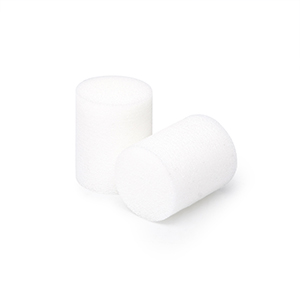
Sponge Test | Cleans the duct by passing a sponge through to remove mud and water. |
Always test your connection before you finish the job. This step helps you catch mistakes early and keeps your network running well.
Tips and Troubleshooting
Tips for Beginners
You can make your installation easier by following advice from industry experts. The right method depends on where you install the microduct. The table below shows helpful tips for different installation methods:
Installation Method | Key Tips |
Direct In-Ground Installations | Ensure the microduct is buried deeply enough to avoid contact with roots and other utilities. |
Maintain a level trench for easy installation. | |
Use clean fill to protect against sharp objects. | |
Micro Trench Installations | Clear debris from the trench and ensure it is dry. |
Level the bottom of the trench to avoid bends. | |
Mole Plow Installations | Ensure the ground is even for a level microduct. |
Use a vibrating plow in areas with roots and stones. | |
In-Duct Installations | Check for enough space in the duct before installation. |
Allow for temperature expansion and avoid twisting during installation. |
Tip: Always keep your work area clean and dry. This helps you avoid problems during installation.
You should also wear gloves and goggles for safety. Take your time to check each step. If you rush, you might miss something important.
Quick Fixes
Sometimes, you may face problems with your microduct connector. You can try these quick troubleshooting steps:
1. Inspect connectors for any physical damage or dirt.
2. Ensure all connectors are firmly plugged into their ports to avoid loose connections.
3. Check for compatibility between the connector type and the device's ports.
4. Use a multimeter to test for continuity and identify faulty connectors.
5. If issues persist, consider swapping out the connectors for new ones.
You can use quick fixes to solve small problems, but long-term solutions work better for lasting results. The table below compares both options:
Feature | Quick Fixes | Long-Term Solutions |
Corrosion Prevention | Limited or no prevention | Effective prevention with new materials |
Air Leakage | Often unresolved | Eliminates air leakage completely |
Connection Security | May be temporary | Enhanced security with lock clip |
Installation Efficiency | May require frequent adjustments | Ergonomic design for easy handling |
Long-Term Cost Savings | Higher maintenance costs | Reduced maintenance and increased lifespan |
Note: Quick fixes help in emergencies, but you should plan for long-term solutions to keep your network strong.
You can install a microduct connector by following simple steps: clean, cut, bevel, align, insert, and test. Careful preparation helps you avoid problems and keeps your network strong. Industry experience shows that these connectors protect cables, make maintenance easy, and save time. Do not worry if you make mistakes. Each attempt helps you learn and improve your skills.
FAQ
You should check that the connector grips both ducts tightly. Pull gently on each side. If the ducts do not slide out, the fit is secure. Look for gaps or loose spots.
Try cleaning the duct ends again. Use the bevel tool to smooth the edges. If the connector still feels loose, replace it with a new one for a better fit.
You should avoid reusing connectors. Old connectors may not seal well. Using a new connector helps you prevent leaks and signal loss.
Cleaning removes dust and moisture. Dirt can cause weak connections and signal problems. Always use lint-free wipes and isopropyl alcohol for best results.
You need a tube cutter, bevel tool, and cleaning wipes. These tools help you make straight cuts, smooth edges, and clean surfaces. Using the right tools keeps your connection strong.
FCST - Better FTTx, Better Life.
At FCST, we manufacture top-quality microduct connector, microduct closure, telecom manhole chambers, Warning Nets and Locators and fiber splice boxes since 2003. Our products boast superior resistance to failure, corrosion, and deposits, and are designed for high performance in extreme temperatures. We prioritize sustainability with mechanical couplers and long-lasting durability.
FCST, aspires to a more connected world, believing everyone deserves access to high-speed broadband. We're dedicated to expanding globally, evolving our products, and tackling modern challenges with innovative solutions. As technology advances and connects billions more devices, FCST helps developing regions leapfrog outdated technologies with sustainable solutions, evolving from a small company to a global leader in future fiber cable needs.